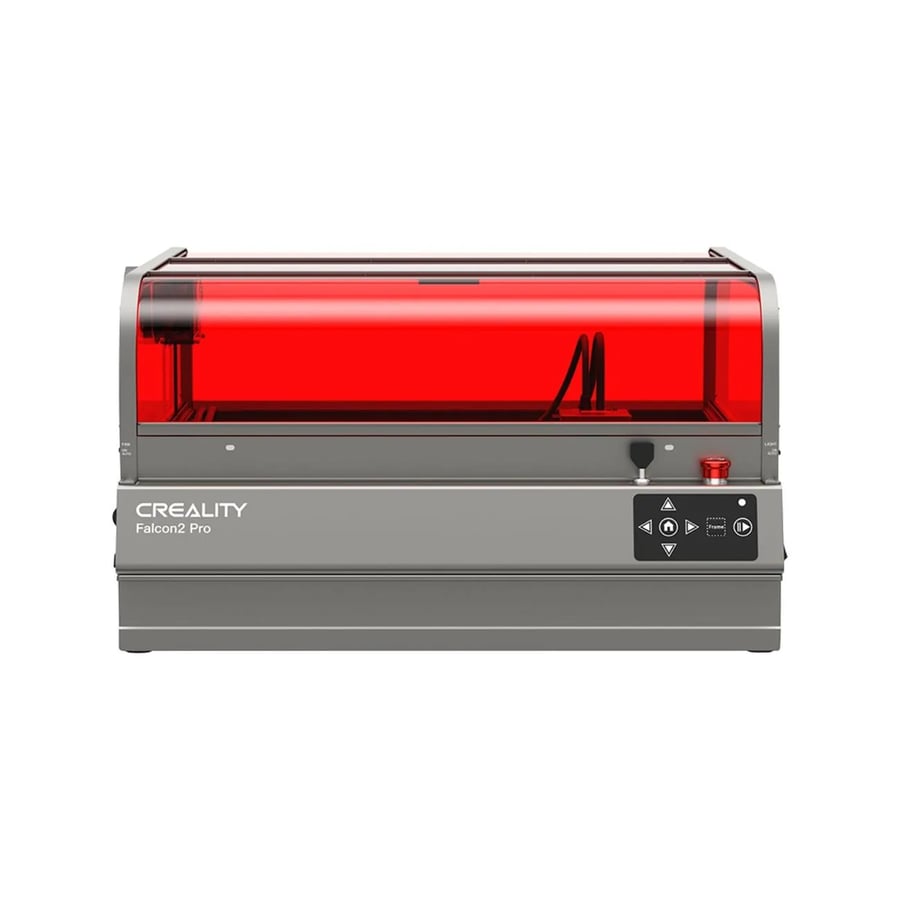


Creality Falcon2 Pro 60W
8999ر.س
14999ر.س-40%Product description
Creality Falcon2 Pro 60W
Compact & Powerful Enclosed Laser Engraver and Cutter

| 60WLaser power | 22 mmWood cut in one pass | Class 1FDA safety |
A 2-in-1 laser engraver and cutter with a fully enclosed design and a built-in camera for auto-positioning, made for small studios and businesses.
Highlight Key Features
 Cutting Power up to 60W |  Adjustable Beam |
 FDA Class 1 Safety |  Built-in Camera for Auto-positioning |
Super Cutting Power
Based on FAC spot compression technology, twelve 5.5W lasers are combined into 60W for very high cutting efficiency.

Cut 22 mm Wood in One Pass
Thick basswood cut through in a single pass.

Cut 30 mm Black Acrylic in One Pass
Clean edges on thick acrylic.

Cut 0.2 mm Stainless Steel Sheet
Thin metal sheets cut in a single pass.
| 22 mmBasswood | 30 mmBlack acrylic | 0.2 mmStainless steel |
Super-higher working efficiency: the Falcon2 Pro 60W cuts common materials faster, taking your small business to a new level.
Integrated Air Assist
Strong airflow for cutting and weak airflow for engraving, automatic or manual, for clean results without burning.
Cleaner Surface
High power vaporizes the material quickly, keeping edges clean instead of charred or yellowed.
 Falcon2 Pro cross-section |  Other cross-section |
Versatility and Precision
Intelligent Beam Adjustment
3 beam levels for smooth transitions between rough cutting and detailed engraving.

Rotary Engraving
Engrave cups and cylindrical items with the Creality Rotary Kit Pro (sold separately).

Large Work Area, Batch Processing
A 400 × 400 mm work area with an HD camera to position and process multiple pieces in one batch.

Built-in Camera for Auto-positioning
Full-frame working view with high-precision live preview to position multiple materials at once.
Unlock Various Creations
 Acrylic |  Wood |
 Leather |  Glass |
 Wine Glass |  Stone |
 Stainless Steel |  Metal |
 Cardboard |  Paper |
 Rubber |  Baseball Bat |
Cut & Engrave
WoodBambooAcrylicCardboardPaperLeatherFabricRubber
Engrave
GlassWine glassesStoneStainless steelMetal
FDA Class 1 Laser Safety

Laser-Filtering Lid
Eye-safe viewing without protective goggles.

Lid-open Safety Stop
The laser stops as soon as the lid is opened to prevent leakage.

Triple Monitoring Systems
Airflow monitoring, flame monitoring and lens monitoring.
5 Safety Guarantees
| 5-direction Sensors | The machine stops and a buzzer sounds if the laser head hits the boundary. |
| Active Stop | Stops on accidental tilt, flip or drop, with buzzer and indicator alerts. |
| Security Lock | Prevents unauthorized operation. |
| Emergency Stop Button | Stop the machine manually and immediately in an emergency. |
| Laser Head Protective Cover | Colored filter glass prevents the laser from dazzling the eyes. |
User-friendly Design

Compact with Push-pull Lid
Suitable for small studios and workshops.
Easy-clean Drawer
A bottom drawer collects debris for fast cleanup.

Offline Creating
Run projects from a TF card without a computer.

Quick Installation
Ready to go in just 10 minutes after unpacking.
Software & Operation
Falcon Design Space
Creality's design and control software for Windows 10 and above, macOS 11 and above, plus a mobile app for iOS and Android.
LightBurn & LaserGRBL
Works with the most popular laser software; Creality provides a dedicated LightBurn device file for the 60W version.
Recommended Parameters
Creality provides an official parameter table for the 60W version by material, so you start without lots of trial runs.
File Formats
JPEG, JPG, PNG, BMP, SVG, DXF and more.
In the Box
| Falcon2 Pro machine | ×1 |
| 60W laser module | ×1 |
| Power supply | ×1 |
| Air assist equipment | ×1 |
| Exhaust pipe | ×1 |
| Clamp | ×1 |
| Silicone tube | ×1 |
| Goggles | ×1 |
| Basswood sheet 300 × 300 × 3 mm | ×1 |
| Basswood sheet 150 × 150 × 2 mm | ×1 |
| Calibration card | ×1 |
| Multi-level fixed focus block | ×1 |
| USB-C cable | ×2 |
| USB-A to USB-C adapter | ×2 |
| TF card | ×1 |
| Card reader | ×1 |
| Key | ×2 |
| Oval head screws | ×26 |
| M4 Allen wrench | ×1 |
| M1.5 / M2 / M2.5 / M3 Allen wrenches | ×1 |
| Open-end wrench | ×1 |
| Tweezers | ×1 |
| Anti-static brush | ×1 |
| Dust-free cloth | ×1 |
| Protective lens | ×1 |
| Velcro strap | ×3 |
| User manual | ×1 |
| Creality stickers | ×1 |
Specifications
| Laser Source | Diode Laser |
| Laser Modules | 12 × 5.5W with FAC spot compression technology |
| Beam Levels | 3 levels, adjustable from software or machine |
| Air Assist | Integrated, automatic or manual |
| Camera | Built-in HD camera for positioning and live preview |
| Offline Creating | Supported via TF card |
| Safety Systems | Lid-open stop, flame, airflow and lens monitoring, 5-direction sensors, tilt/drop stop, security lock, emergency stop button |
| Optical Power | 60W |
| Machine Power (Max) | 360W |
| Engraving Area | 400 × 400 mm |
| Laser Spot | 0.08 × 0.15 mm |
| Laser Wavelength | 455±5 nm |
| Laser Class | Class 1 (FDA) |
| One-pass Cutting | 22 mm basswood, 30 mm acrylic, 0.2 mm metal sheet |
| Input Voltage | 200–240 VAC, 60 Hz |
| Output Voltage | DC 24V, 15A |
| Operating Temperature | 5°C – 35°C |
| Product Dimensions | 664 × 570 × 328.4 mm |
| Net Weight | 19.51 kg |
| Laser Software | Falcon Design Space, LightBurn, LaserGRBL |
| Operating System | Windows / macOS |
| Supported File Formats | JPEG, JPG, PNG, BMP, SVG, DXF, etc. |
| Supported Materials | Cardboard, wood, bamboo, rubber, leather, fabric, acrylic, plastic, etc. |
| Certifications | IEC60825, FDA, CE, RoHS, FCC, UKCA, UL Report, PSE |
| Package Size | 770 × 645 × 285 mm |
| Gross Weight | 25.74 kg |
FAQs
Is it safe to use at home?
Yes. The fully enclosed FDA Class 1 design blocks laser light and stops automatically when the lid is opened, so it suits home and studio use without goggles.
Is it beginner-friendly?
Yes. It is ready to go in 10 minutes, and the built-in camera lets you drag and drop your design exactly where you want it on screen.
How do I maintain it?
Clean the lens regularly, ensure good ventilation while working, and follow the maintenance schedule in the user manual.
Wayto3D
Authorized Creality Distributor in Saudi Arabia
✓ Official Warranty✓ Local Technical Support