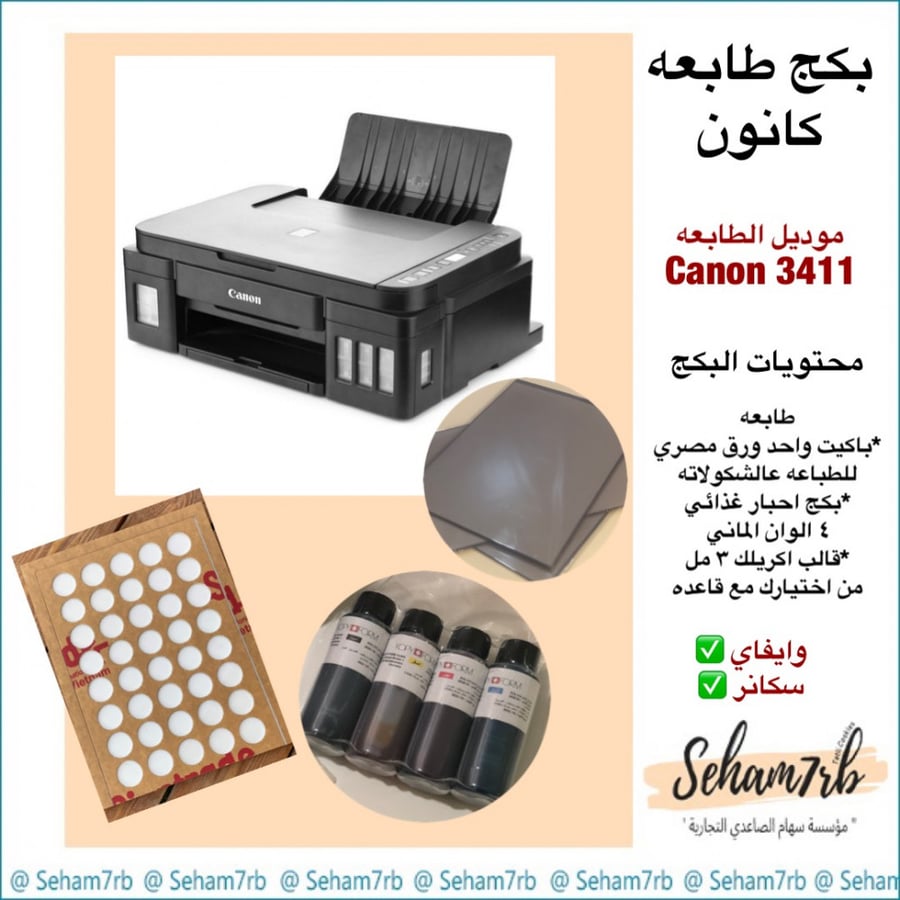
Canon package
900ر.س
Product description
How to use the food printer
Read the instruction booklet
Turn on the printer
Fill the ink cartridges with edible ink
Print a test ink paper
Connect the printer to the computer or mobile to create your design
Insert regular paper for testing, start printing
After mastering, you can now use the food paper
Note: more than 10 sheets should be placed in the printer tray
Specifications of the complete food printing set
Canon printer
Edible food ink
Compatible with food papers
The printer's ink system consists of refillable tanks
Resolution 1200 * 4800 dots per inch
Items included in the food printer set
Canon printer
German food ink, 4 colors, 100 ml
Pack of 25 sheets of chocolate printing
Acrylic mold 3 cm E013
Acrylic mold base
Note: Be sure to completely empty the ink tank when not in use to ensure the safety of the print heads
Important tips to maintain the Canon food printer:
The Canon printer is a regular modified printer and is not covered by warranty after filling with edible ink
The warranty does not include the print heads
Remove the ink cartridge from the printer if not in use
Make sure to fully empty the ink tanks and print a test sheet to verify the tanks are completely empty
Not using the printer for a long time while there is ink or ink traces in the tanks can damage the printer
Exposing the ink to hot environments or sunlight may damage the ink
Keep the ink in a cool place to prevent ink drying out
If the ink dries out, you can refer to the user booklet or the printing cycle if you are subscribed to it to learn how to handle temporary drying.
