
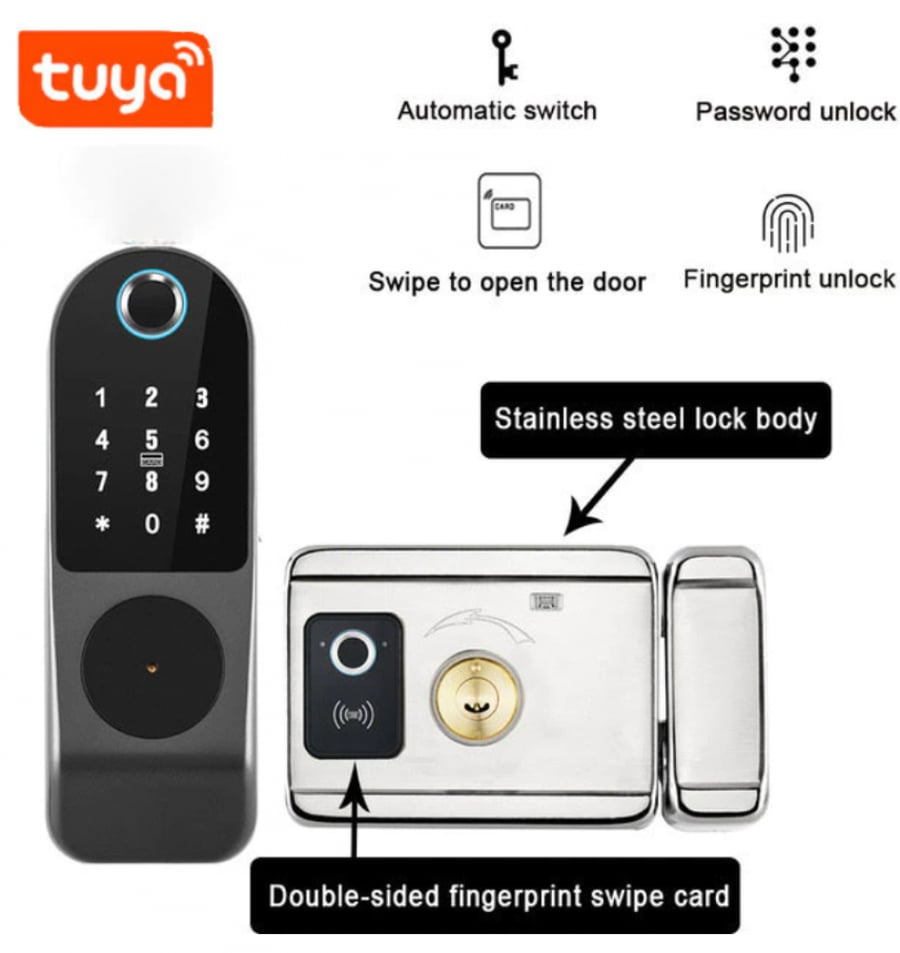
Smart lock for the external door
599ر.س
Product description
Specifications Materials: Zinc alloys Panel sizes: 166 (mm) * 33 (mm) * 56 (mm) Media opening: fingerprint/password/IC card/app/mechanical key Support app name: Tuya app, fingerprint recognition time: 0.25S Fingerprint users: 100 pieces Card users: 100 pieces Password users: 100 pieces Power supplies: 4 AA batteries or 12V DC IP rating: IP55 Operating temperature: -25 to 55 degrees Celsius Suitable door thickness: 20-80 millimeters (wooden door, steel door, iron door, other metal doors) Emergency charging: USB port Smart lock supports biometric fingerprint/password/IC card/mechanical key/app multiple opening methods. Uses live fingerprint recognition technology to improve fingerprint recognition accuracy. Touch anti-zigzag. Add random numbers to protect your password from prying eyes. You can write any number of random digits on the keypad, and still access as long as the correct password 1 is included in the longer set of numbers. Magnetic card door lock contains a high-sensitivity integrated card reader chip. High recognition rate and accuracy. The smart lock supports two emergency opening methods: mechanical key (old model opening method) and USB emergency power supply. When the lock is out of power, you can use a power bank to charge. Remote control function provides remote door opening. The lock will automatically lock after closing the door. If there are no obstacles, recognition distance is 30 meters. The maximum number of remote controls that can be added to each lock is 20. If you purchase a remote control, please contact us to provide a installation video. Face fingerprint reader: This device is specifically used for courtyard gates. The face fingerprint reader uses fingerprint/card to open the door from inside to prevent someone from gaining access and opening the door. Tuya app functions: 1. Press 9 # on the lock panel to request opening, and open remotely via the phone app. 2. Copy password to open. 3. Send temporary password for remote opening. 4. Check remote opening logs. 5. Connect directly to Wi-Fi, no gateway needed.

From Tabuk
Questions you might have