Huawei AR580 Security Gateway Router with 3 WAN and 10GE SFP+
1873.73ر.س
Product description
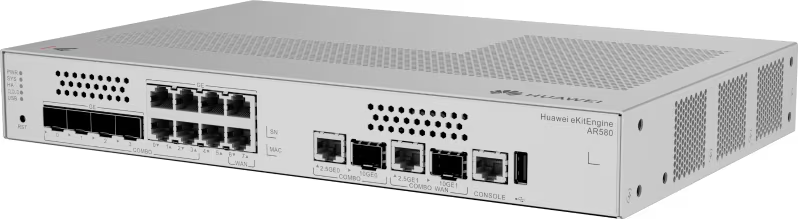
The Huawei AR580 is a business gateway from the eKitEngine AR580 series with three WAN ports, including a 10GE SFP+/2.5GE combo, and seven LAN ports. It suits offices and compounds that run more than one internet line and want a fibre link to the core switch.
====
The Huawei AR580 is a business gateway from the eKitEngine AR580 series, which Huawei's official datasheet titles a "Security Converged Gateway". It brings together three WAN ports and seven LAN ports, two of which run at 10GE over SFP+ or 2.5GE over copper. If your company needs more than one internet line plus a fast fibre uplink to the core switch, all from a single quiet unit, this is the model to look at.
Huawei AR580 port layout
The AR580 has the following ports:
- 1 WAN combo port: 10GE via SFP+ or 2.5GE via RJ45.
- 2 gigabit WAN ports.
- 1 LAN combo port: 10GE via SFP+ or 2.5GE.
- 4 gigabit LAN combo ports that take copper or an optical module.
- 2 gigabit copper LAN ports.
- 1 USB 2.0 port.
Three internet lines, one box
With three WAN ports you can run a primary STC fibre line on the fast port, a second line from Mobily or Zain on a gigabit port, and keep the third free for a backup.
Combo ports: copper or fibre, your call
A combo port means you don't have to commit to a cable type on day one. Core switch in the same room? Use a normal patch cable. Switch on a far floor or in another building? Fit an SFP module and run fibre. The 10GE LAN port links the router to a switch with SFP+ uplinks, such as Huawei's S310 series, so the router-to-switch link doesn't become the bottleneck as user numbers grow.
Fanless, with built-in power
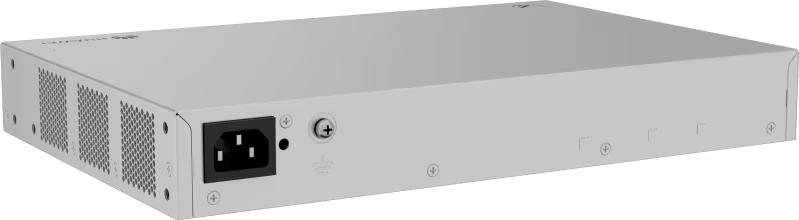
According to the model description, the AR580 has no fan and its AC power supply is built into the chassis. That means no external adapter lost behind the rack and no fan noise in an open-plan office or admin room.
Where it fits in Saudi Arabia
- A mid-sized office in Riyadh with a main fibre line and a backup from a second ISP.
- A clinic complex that needs a stable connection for patient records and bookings.
- A villa compound or apartment building feeding floor switches over fibre.
- A Dammam warehouse linking its admin office to the storage hall with an optical cable.
AR580, AR580Plus or AR580Pro?
All three have 3 WAN ports; the port types are what differ:
- AR580: one 10GE/2.5GE combo WAN plus two gigabit WAN; 7 LAN ports including a 10GE/2.5GE combo and four GE combos; one USB.
- AR580Plus: a 10GE SFP+ WAN plus two 2.5GE WAN; 7 LAN ports including 10GE SFP+ and two 2.5GE; one USB.
- AR580Pro: three gigabit combo WAN with no 10GE; 9 LAN ports including 10GE SFP+; two USB ports and two SIC slots.
Choose the AR580 when you want copper-or-fibre flexibility on the most ports.
Frequently Asked Questions
Can I connect an STC line and a Mobily line to the Huawei AR580?
Port-wise, yes: the model description lists 3 WAN ports.
What is a combo port on the AR580?
A single port that takes either a copper RJ45 cable or an optical SFP module, so you can use fibre for long runs between buildings and copper inside the same room.
Does the AR580 need an external power adapter?
No. The model description lists a built-in AC power supply, so a standard power cord plugs straight into the unit.
Specifications
- Model: AR580
- Product line: HUAWEI eKitEngine AR580 Series Security Converged Gateway (eKit distribution line)
- WAN ports: 1 × 10GE SFP+/2.5GE combo + 2 × GE
- LAN ports: 1 × 10GE SFP+/2.5GE combo + 4 × GE combo + 2 × GE
- USB: 1 × USB 2.0
- Power supply: Built-in AC power
- Cooling: Fanless
Features
- 3 WAN ports: a primary fibre line, a second ISP and a spare port for a backup link.
- Two 10GE SFP+/2.5GE combo ports (one WAN, one LAN): choose fibre or copper to suit the distance.
- 7 LAN ports including 4 GE combo ports: reach switches on other floors or buildings over fibre.
- Fanless with built-in AC power: no noise and no external adapter hiding behind the rack.
- 1 × USB 2.0 port: an extra port for service and maintenance, as supported by Huawei.
