Fanvil CA200 Wireless Screen Sharing Kit with 4K Casting
939.93ر.س
Product description
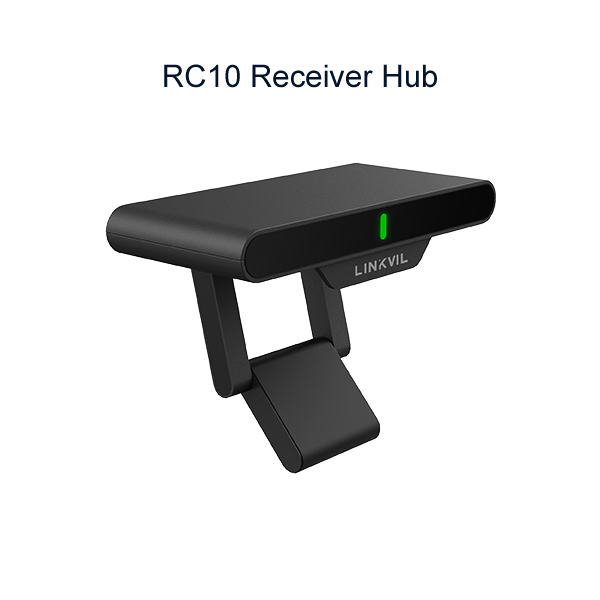
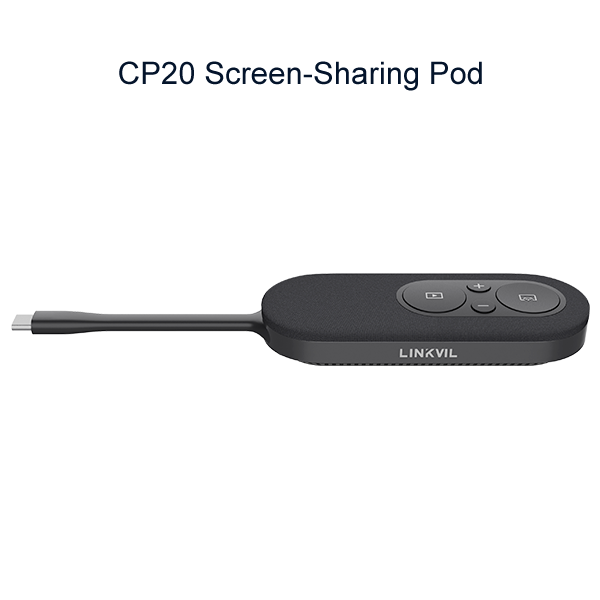
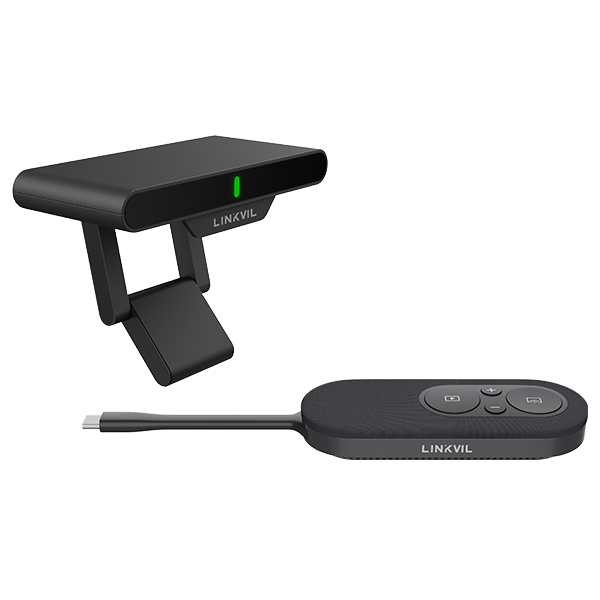
The Fanvil CA200 is a two-piece wireless conference kit: a CP20 pod for your laptop and an RC10 receiver for the display. One press casts your screen in up to 4K to any HDMI screen, with no software to install, which makes it a fit for meeting and training rooms tired of cable clutter.
====
The Fanvil CA200 takes the HDMI cable off the meeting table. This LINKVIL wireless conference kit pairs a CP20 pod, which plugs into your laptop's USB-C port, with an RC10 receiver hub connected to the room display. Press the button on the pod and your screen appears in up to 4K. There is nothing to install and no driver to hunt for, so a visitor can present as easily as a regular team member.
Fanvil CA200 key specs
The numbers that matter when you plan a room:
- Screen sharing up to 4K UHD at 30 fps.
- Mirror mode or extended desktop, so you can show slides and keep your notes on the laptop.
- Wi-Fi 5 / Wi-Fi 6 on the 5 GHz band, encrypted with WPA3-PSK.
- Up to 4 CP20 pods per receiver: one in the box, three more sold separately.
- Works with any TV or projector that has an HDMI input. No brand lock-in.
Freeze mode for private moments
Mid-presentation you may need to check an email or dig through a folder. Tap Freeze on the CP20 and the last frame holds on the big screen while you work on your laptop out of view. Tap again and live sharing resumes. Volume buttons on the same pod adjust your laptop's system volume, so you do not have to walk back to it.
Add a camera or speakerphone through the receiver
The RC10 has a USB-A 2.0 port for a UVC camera, microphone or speakerphone. Once connected, your meeting software sees those devices over the wireless link as if they were plugged into the laptop. The same port supports reverse control with a USB-A to USB-B cable (not included). Setup takes minutes: the 5 V/2 A power adapter and a 1.5 m HDMI cable come in the box, and the receiver mounts magnetically or on a universal stand.
Where the CA200 fits in Saudi offices
- Meeting rooms in Riyadh and Jeddah offices where everyone brings a different laptop.
- Training rooms and private school classrooms, where the trainer moves around while presenting.
- Engineering and contracting offices that review drawings with clients on a large screen.
- Hotel function rooms that change layout every day; the kit is small enough to move between halls.
Laptop and phone compatibility
The CP20 works with Windows and Mac computers, tablets and smartphones that have a full-featured USB-C port, meaning it carries power, data and DisplayPort Alt Mode video. A USB-C port limited to charging and data will not output a picture, so check your laptop's port before ordering. The display shows one source at a time; presenters take turns with the share button.
Fanvil CA200 or CA400?
The CA200 is a screen-sharing kit only: a CP20 pod and an RC10 receiver, with no microphone, speaker or camera. The CA400 uses the same RC10 but replaces the pod with an MS10 speakerphone (8 microphones, 4 m pickup, 3 W speaker) and adds a CM70 4K camera and a remote. Pick the CA200 when your room already has audio and video gear and you only need wireless presenting. Pick the CA400 to equip a small meeting room from scratch.
Frequently Asked Questions
Do I need to install software for the Fanvil CA200?
No. Plug the CP20 into a full-featured USB-C port, press the share button, and your screen appears. No apps or drivers.
Will it work with any USB-C laptop?
Only with USB-C ports that output video through DisplayPort Alt Mode as well as power and data. Charge-and-data-only ports will not show a picture.
How many presenters can use one kit?
The RC10 receiver pairs with up to 4 CP20 pods: one included, three sold separately. One screen is shown at a time and presenters switch with the share button.
Specifications
- Model: CA200 (Fanvil LINKVIL line)
- Kit components: CP20 screen-sharing pod + RC10 receiver hub
- Screen-sharing resolution: Up to 4K UHD @ 30 fps
- Sharing modes: Mirror and extended desktop
- Freeze mode: Supported
- Synchronized BYOD volume control: Supported
- Software / driver: Not required
- Reverse control: Supported via USB-A to USB-B cable (not included)
- Display output: HDMI via RC10
- Display compatibility: Any display with HDMI input, no brand requirement
- Max CP20 pods per RC10: 4 in total (3 additional sold separately)
- Simultaneous sources: 1 (switch with the screen-sharing button)
- Pairing extra CP20 pods: Pairing adapter (included) or H2C (optional)
- Wi-Fi standard: Wi-Fi 5 / Wi-Fi 6
- Frequency band: 5 GHz
- Max transmit power (EU): 20 dBm
- Encryption: WPA3-PSK
- CP20: connection: Integrated USB-C cable, 85 mm
- CP20: required laptop port: Full-featured USB-C with USB PD, data and DisplayPort Alt Mode
- CP20: power: 5 V / 900 mA, 2.5 W consumption
- CP20: buttons: Screen-sharing, volume +/-, Freeze
- CP20: indicators: Flashing green: connecting; solid green: ready; yellow: no DisplayPort signal; red: connection failed. Freeze LED: green sharing, red paused
- CP20: dimensions and weight: 189 × 40 × 18 mm, 62 g
- RC10: ports: 1× HDMI to display; 1× USB-C PD power 5 V/2 A; 1× USB-A 2.0 (5 V/0.9 A) for UVC camera, mic, speakerphone or reverse control
- RC10: settings button: Press: change on-screen language (12 languages); hold 5 s: clear pairing and reset
- RC10: dimensions and weight: 102 × 45 × 20 mm, 85 g
- Mounting: Magnetic attachment and universal stand
- Compatible devices: Windows/Mac PCs, laptops, tablets and smartphones with full-featured USB-C
- Operating temperature: -10°C to +40°C
- Operating humidity: 0% to 95% RH
- In the box: CP20 pod, RC10 receiver hub, pairing adapter, 1.5 m HDMI cable, 5 V/2 A power adapter, quick installation guide
Features
- 4K UHD casting at 30 fps: spreadsheets and drawings stay sharp on the room display.
- Freeze button: the last frame stays on screen while you look for a file or reply to a message in private.
- Up to 4 CP20 pods per receiver: each presenter shares from their own laptop with one press, no cable swapping.
- Wi-Fi 5 / Wi-Fi 6 on 5 GHz, WPA3-PSK encrypted: a direct link that stays off the office network.
- USB-A 2.0 port on the receiver: plug in a UVC camera or speakerphone and the laptop uses it wirelessly.
