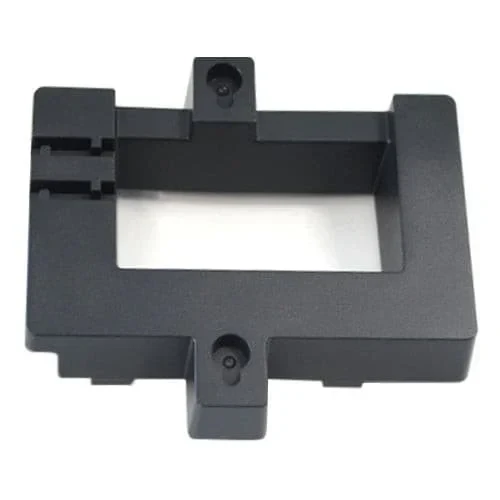
Grandstream GRP_WM_S Wall Mount Bracket for GRP2612 and GRP2613
14.02ر.س
Product description
Own a GRP2612 or GRP2613 and want it on the wall? The Grandstream GRP_WM_S is the bracket Grandstream specifies for those models. It clips to the back of the phone and hangs on two screws, ideal for clinics, server rooms and factory floors.
====
If your desk phone is a GRP2612 or GRP2613, the Grandstream GRP_WM_S is the bracket Grandstream specifies for hanging it on a wall. It is sold on its own; the phone box does not include it.
Phones that take the GRP_WM_S
Grandstream names these models for the bracket:
- GRP2612, GRP2612P and GRP2612W
- GRP2613
How it goes on
First reverse the hookswitch tab so its extension points up; that holds the handset once the phone is upright. Next, push the bracket's ribs into the groove on the back of the phone until it locks in.
On the wall, mark two points one above the other through the mounting slots, drill them, and fit an anchor and screw in each, leaving the heads proud. Hang the phone on the screws. Screws and anchors are not supplied.
Good spots for it
- A compact clinic reception in Jeddah with no room on the counter.
- Server and electrical rooms where a technician needs a line close by.
- Factory floors, with the phone fixed to a column.
How the GRP_WM_S differs from the GRP_WM_A and GRP_WM_L
Installation is identical across the three. The GRP_WM_S covers only the GRP2612 family and the GRP2613. GRP2601 to GRP2604 phones need the GRP_WM_A, while the GRP2614 and GRP2615 need the GRP_WM_L.
Frequently Asked Questions
Why flip the hookswitch tab?
On the wall the phone stands upright, and the raised extension keeps the handset from sliding off. Turn it back down for desk use.
Will it fit a GRP2614?
No. The GRP2614 and GRP2615 use the GRP_WM_L.
Specifications
- Model: GRP_WM_S
- Type: Wall mount bracket for Grandstream desk IP phones (sold separately from the phone)
- Compatible phones (per Grandstream): GRP2612, GRP2612P, GRP2612W, GRP2613
- Attaching to the phone: Bracket ribs slot into the groove on the back of the phone, then press to seat
- Wall fixing: Two wall mount slots; two vertical points on screws with plastic anchors
- Screws and anchors: Not included
- Hookswitch tab: Extension up when wall-mounted; extension down recommended for desk use
Features
- 4 models on the official compatibility list: GRP2612, GRP2612P, GRP2612W and GRP2613.
- 2-step fit: push the ribs into the rear groove, then press until it locks in.
- 2 wall mount slots: two vertical holes and two screws carry the phone.
- 2-position hookswitch tab: up on the wall so the handset stays in, down when the phone goes back on a desk.
