DSPPA DMA60W Bluetooth Wall Touch Panel for DMA6112/DMA6124
386.76ر.س
Product description
The DSPPA DMA60W is an 86-box wall panel that controls source and volume for one zone of a DMA6112 or DMA6124 matrix amplifier, with Bluetooth for playing music from a phone. It suits hotels, schools and offices that want each room to run its own audio. • Compatible hosts: DMA6112 and DMA6124 • Power: 48V DC from the host • Distance: 300 to 600 m per channel • Volume range: 0 to 32 • Addressing: 3-bit DIP switch, zones 1 to 6 • Size: 86 x 86 x 38 mm
====
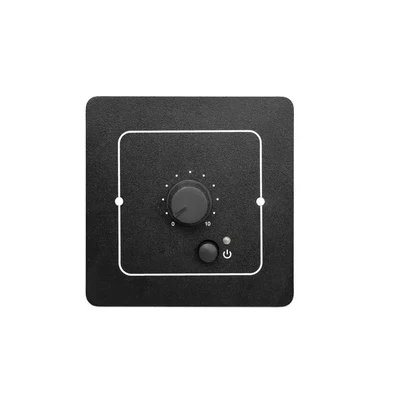
The DSPPA DMA60W is a Bluetooth wall control panel built for the DMA6112 and DMA6124 matrix amplifiers. It fits a standard 86 back box in the room it serves and gives people there control of the source and volume for that zone only. Pair a phone over Bluetooth and the room plays your music. Power comes from the host at 48V DC, so there is no adapter on the wall.
DSPPA DMA60W at a glance
- Works with: DMA6112 (6 x 120 W) and DMA6124 (6 x 240 W).
- Buttons: previous source, next source, volume up, volume down, Bluetooth.
- Volume range: 0 to 32.
- Power: 48V DC from the host; DSPPA quotes 300 to 600 m per channel.
- Addressing: 3-bit DIP switch for zones 1 to 6.
- Size: 86 x 86 x 38 mm.
One panel per zone
The host splits a building into 6 zones and has 6 panel ports on the back, each tied to a fixed zone: ZONE1 to CP1, through ZONE6 to CP6. Set the DIP switch on the back to the zone and the Bluetooth name changes to match, CP1 to CP6, so staff know which panel they are pairing with. DSPPA insists the wiring follows this mapping: a panel on the wrong zone port still switches sources, but no audio comes out.
Picture a Riyadh office tower lobby, a cafe on the ground floor and a meeting floor upstairs. The cafe panel runs a playlist from AUX1, the lobby stays on FM radio, and neither one touches the other.
Playing music from a phone
Hold the Bluetooth button to switch Bluetooth on; the indicator flashes until a phone connects. Search for the panel's name on your phone and enter the default code 1234. A short press jumps straight to the Bluetooth source. The previous and next buttons step through the sources, including A0 (MP3, FM and the host's own Bluetooth) and A1 and A2 for the two AUX inputs.
Status and fault codes
Short codes save the installer time:
- C0 mute, C1 siren, C2 EMC emergency input, C3 remote paging mic.
- E0: no response from the host for 3 seconds.
- E1: fault on the zone amplifier linked to the panel.
The host gives emergency input, siren, chime and the paging mic priority over the panel, so an announcement cuts in and the music returns afterwards. The back of the panel has a network port; agree the cable type with your installer first.
Where it fits
- Schools: a panel in the theatre or sports hall, with the main PA kept central.
- Hotels and restaurants: each hall picks its own source and level.
- Offices and malls: soft music in the waiting area, silence in the meeting room.
DMA60W or DMA60M?
Both connect to the same host but do different jobs. The DMA60M is a paging microphone that sends announcements to the zones, with up to 2 per host on CAT5e or better. The DMA60W is a single-zone control panel with Bluetooth, and you can fit up to 6, one per zone. Still choosing the host? The DMA6112 and DMA6124 differ in power: 120 W or 240 W per zone.
Frequently Asked Questions
Does the DMA60W work without a DMA6112 or DMA6124?
No. It is a control peripheral for those hosts, takes its 48V DC power and audio from them, and has no amplifier of its own. Choose the host first.
How many DMA60W panels can one host take?
Up to 6, one per zone. Set the DIP switch to the zone number and wire the panel to that zone's port on the host (CP1 to ZONE1, and so on).
How do I pair my phone?
Hold the Bluetooth button until the indicator flashes, search for the panel's name (CP1 to CP6) on your phone and enter the default code 1234.
Specifications
- Model: DMA60W
- Type: Bluetooth wall-mount touch control panel
- Compatible hosts: DMA6112 (6 x 120 W), DMA6124 (6 x 240 W)
- Built-in amplifier: No; the panel is a control peripheral, amplification is in the host
- Front controls: Previous source, volume up, volume down, Bluetooth, next source
- Volume range: 0 to 32
- Sources: A0 (MP3, FM, Bluetooth), A1 (AUX1), A2 (AUX2), panel Bluetooth
- Control scope: Source and volume of its own zone only
- Bluetooth: Device name CP1 to CP6 by address, default pairing code 1234
- Addressing: 3-bit DIP switch (ADD1 to ADD3) for zones 1 to 6
- Max panels: 6 per host, one per zone
- Power: 48V DC from the host
- Transmission distance: 300 to 600 m per channel
- Rear panel: DIP switch, network interface
- Status codes: C0 mute, C1 siren, C2 EMC, C3 remote paging mic
- Error codes: E0 no host response for 3 s, E1 zone amplifier fault
- Mounting: Standard 86 back box
- Dimensions: 86 x 86 x 38 mm
Features
- Single-zone control, 1 of 6: each panel changes source and volume for its own zone only, leaving other rooms untouched.
- Bluetooth with code 1234: pair a phone with the panel by name (CP1 to CP6) and play music in that room.
- 48V DC from the host: no power adapter or socket needed next to the panel.
- 300 to 600 m per channel: panels can sit in halls far from the equipment room.
- Status and fault codes (C0 to C3, E0 and E1): installers see why audio stopped without opening the host.
