


Keyboard LP
230ر.س
Out of Stock
Product description
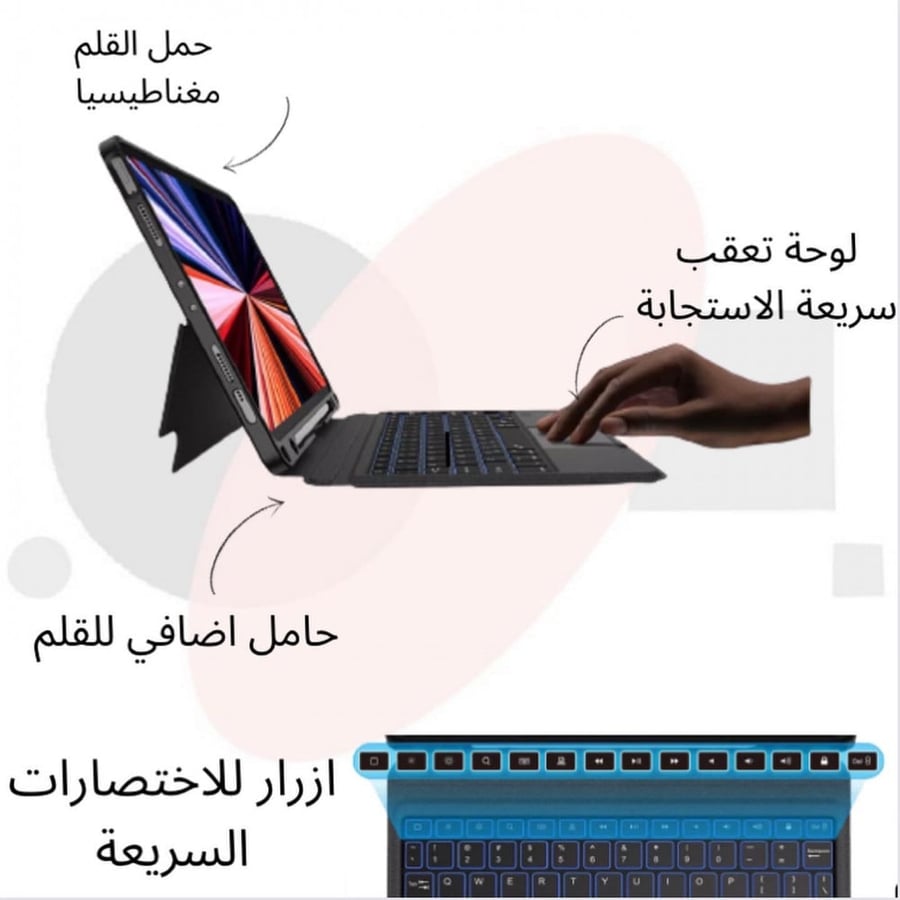
Lp keyboard from Lajin Penser is a keyboard with two functions, as it works as a keyboard and can be detached to become a lightweight protective cover. It provides a smooth and comfortable typing experience on the device, with a quick response touchpad that supports smart gestures to make typing and page navigation easier. The button design on this keyboard features modernity and high thinness, making it an ideal choice for productive and creative tasks.
iPad Keyboard specifications:
Category: iPad accessories
Color: Black
The cover supports angles from 30 degrees up to 160 degrees
Supports Arabic and English languages
The keyboard has 3 different indicators showing: keyboard status, battery status, and keyboard connection to the iPad
iPad Keyboard features:
Innovative design that allows you to easily detach the keyboard from the cover for a flexible usage experience with a practical cover for protection against shocks and scratches.
Smart touchpad provides precise and quick control of your device with your hand, and also supports smart gestures to increase productivity.
A set of quick functions on the first row of the keyboard enables control of volume, lighting, copy and paste, screen capture, video pause, and more.
A protective and reinforced cover for the edges to maintain your device’s safety, lightweight for easy carrying and use.
An exceptional typing experience with low noise during typing for a quiet work environment.
Connection method to the iPad:
Turn on the keyboard.
Press Del + Fn to activate Bluetooth pairing mode.
Select the keyboard from the available devices list on your device.
Adjusting Arabic characters:
Go to Settings ← General ← Keyboard.
Tap on Keyboards → Add New Keyboard.
Choose Arabic Keyboard ← Personal Computer.
Return to General ← Keyboard ← External Keyboard.
Select Arabic ← Personal Computer.
Important notes for longer battery life:
Turn off the keyboard when not in use.
Charge the keyboard before the battery is completely drained.
Sleep mode:
The keyboard enters sleep mode after 15 minutes of inactivity.

From Jeddah