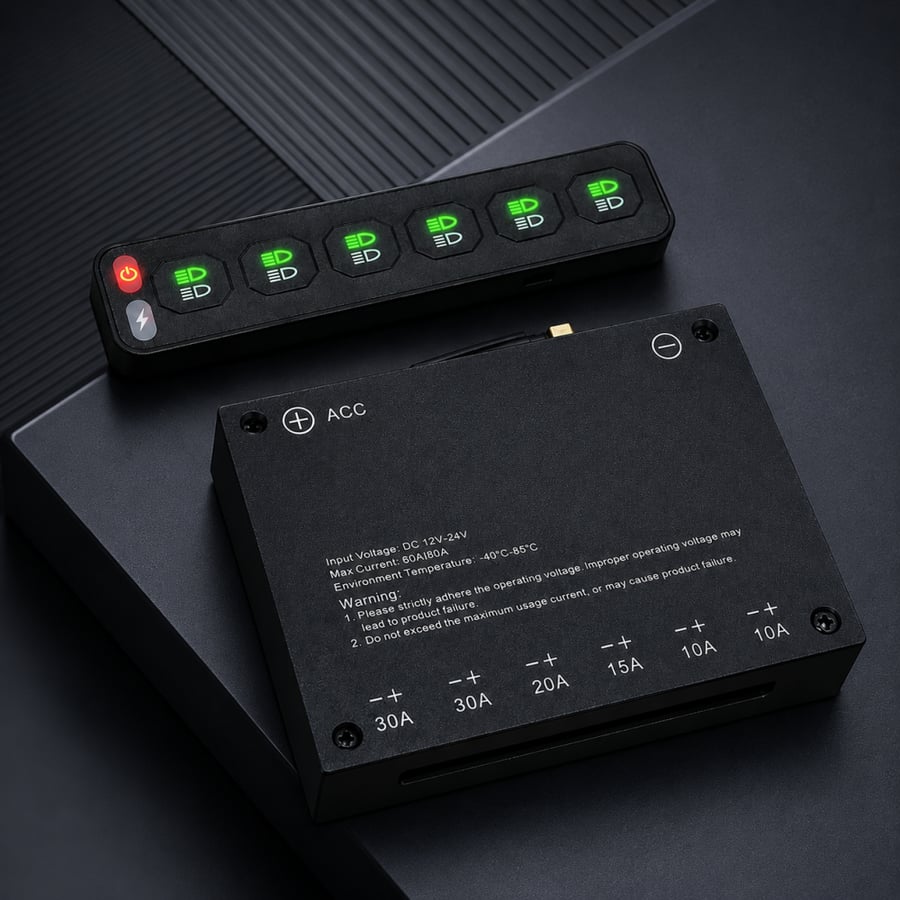


Wireless remote control box
519.80ر.س
Product description
Wireless control panel for vehicle equipment | Easy and precise control
Control box description
Indicator light (Indicator light Description)
- Off indicator: device is off and in standby mode.
- Red indicator: off.
- Green indicator: on.
- Charging: 5 volts / 600 milliamps, available using a C-TO-C cable.
Input Voltage
- 12-24 volts (DC)
Operating Temperature
- from -40°C to 85°C.
Linkage Method
- 2.4 GHz.
Materials
- Aluminum with powder coating.
Battery Capacity
- 3.7 volts / 600 milliamps.
Charging Port
- 5 volts / TYPE-C, available using a C-TO-C cable.
Coding Method
1. Long press the power/on-off button until the green indicator flashes three times, then press the button again.
2. When the green indicator is lit, press any button on the transfer panel to turn off the green indicator, indicating successful coding.
3. Upon successful coding, the indicator will flash once when any button on the transfer panel is pressed.
- Note: If coding fails, cut the power for 10 seconds and try again.
Connection Method
Electrical pole connection:
- Connect the negative pole of the battery to the positive terminal position.
- Connect the positive pole of the battery to the positive terminal position.
Control box connection:
- Connect the control box to the vehicle’s ACC-ID via the white cable.
ACC cable:
- Usually a replaceable and improved signal receiver.
- Integrated control box that allows equipment to be equipped with a speaker and can be directly installed anywhere in the vehicle.
Additional components:
- Signal receiver.
- Remote control coding key.
- Single free circuit plug.
- Connection terminals.
Device connection:
- Connect devices to the positive and negative terminals via simple wiring.

From Riyadh