



Human Resources Template - English Version
99ر.س
199ر.س-50%Product description
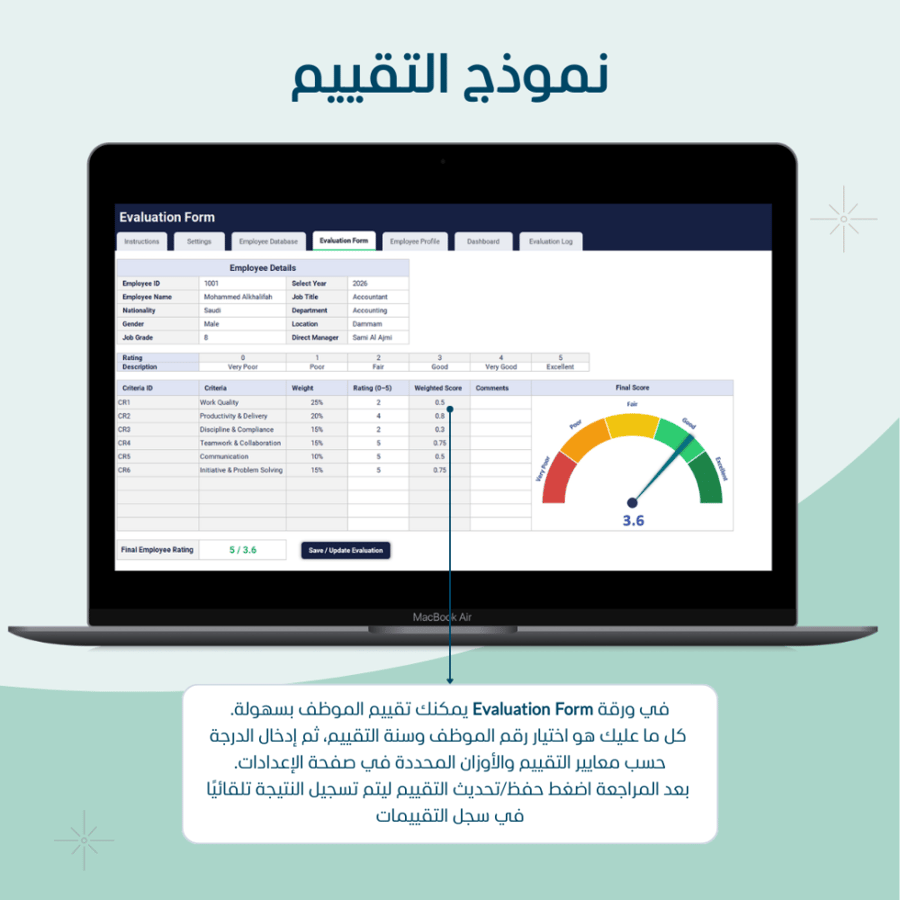
A practical template designed to organize employee data professionally and clearly, with an annual performance evaluation linked to each employee, and a dashboard displaying the most important indicators and charts automatically. Suitable for companies that need a quick solution without system complexity.💡 What does this template offer you?🔹 Comprehensive employee database Record employee data in an organized table including: Personal information Identity/residency data Job details (department/location/title/rank…) Contract details + start/end dates Medical insurance Salary and allowances details 🔹 Contract and insurance follow-up “automatic status” The template supports tracking expiration dates and automatically displays the contract/insurance status (such as: active / about to expire / expired) based on the expiration dates and the alert period set in the settings.🔹 Annual performance evaluation form Evaluate the employee annually based on the criteria and weights you choose, then save the result in the evaluation record with a click of a button🔹 “Employee Data” page ready for printing and export Select the employee from the dropdown list to display their full file with the option to export the file in PDF format with a click of a button🔹 KPIs and charts dashboard A control panel displaying the most important KPIs and charts such as: Total salaries by departments Employee distribution (e.g., gender) Data-driven indicators based on departments/locations Quick summaries to help you make decisions✅ Ideal for: HR teams Small and medium-sized companies Any entity that needs to organize employee data and perform annual performance evaluations in a simple and clear way🔔 Important notes: Works on Excel 2019 or later on desktop Do not delete any sheets or columns within the template to avoid formula issues Data links automatically between sheets — just enter data in the designated cells The template contains macro features for full functionality It works on Excel desktop (Windows/Mac). Macros do not work on Excel Online Download the file and save it as an Excel Macro-Enabled Workbook (*.xlsm) When opening the file for the first time, click Enable Content from the yellow bar If policies prevent macros: go to File > Options > Trust Center > Trust Center Settings > Macro Settings and choose the Allow option (or add the template folder to Trusted Locations) The template is open source It does not include custom modifications for each client

From Al Khobar