
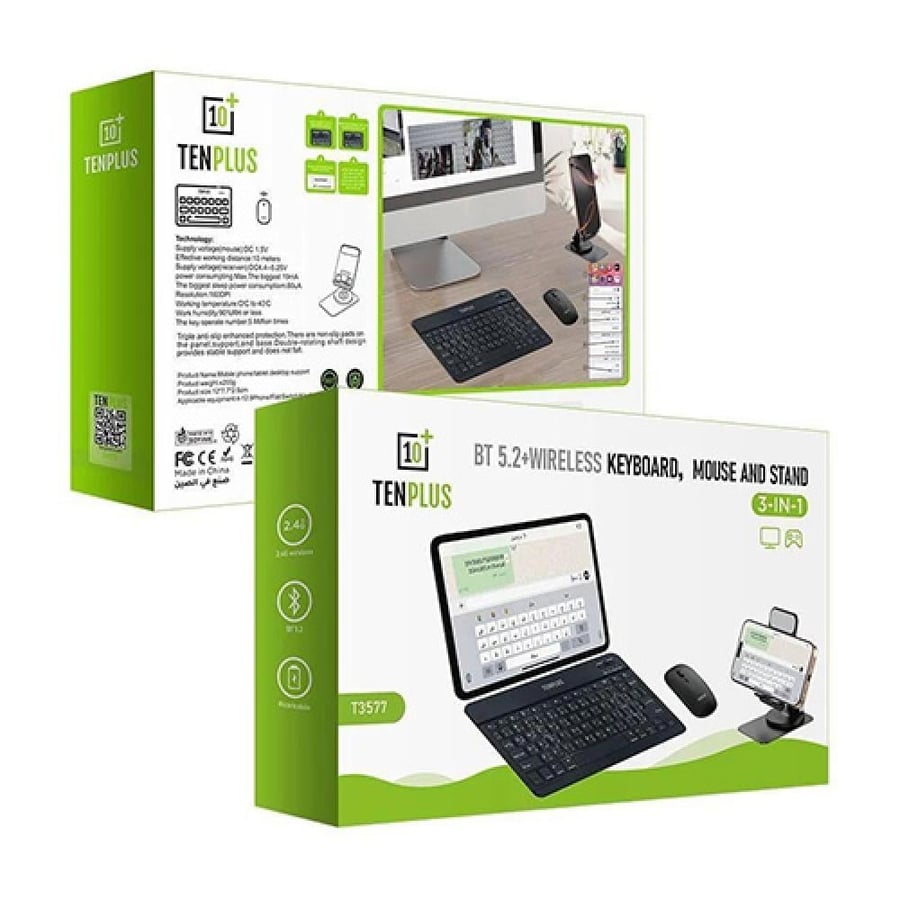
Wireless keyboard, mouse, and stand TENPLUS T3577 3 in 1 supports Arabic Bluetooth 5.2
99ر.س
160ر.س-38%Product description
If you use the iPad or tablet in studying, meetings, note-taking, or replying to emails, then you probably know that writing on the screen is not always comfortable. Keyboard, mouse, and TENPLUS 3-in-1 stand give you a simple solution: a keyboard, mouse, and device holder in the same set, without many wires or clutter on the desk.
Brief specifications list
• [Product name]: TENPLUS T3577 | Wireless keyboard, mouse, and stand 3 in 1.
• [Product type]: Keyboard + mouse + holder | Small office set for tablet and phone.
• [Connection]: Bluetooth 5.2 | 2.4G Wireless (greater flexibility depending on device).
• [Language]: Supports Arabic | Suitable for typing in Arabic and English.
• [Keyboard]: Slim design | Comfortable keys (suitable for daily typing).
• [Mouse]: Wireless | Practical and precise control (suitable for browsing and work).
• [Stand]: Phone and tablet holder | Better viewing angle (useful for studying and meetings).
• [Battery]: Rechargeable | Practical use without frequent battery changes.
• [Use]: Study | Work | Meetings | Browsing | Watching | Travel.
• [Compatibility]: iPad | Android | Windows | Mac (depending on Bluetooth or 2.4G support).
• [Color]: Black with practical design | Suitable for office and university.
• [Model]: T3577 | from TENPLUS.
• [Box contents]: Keyboard | Mouse | (Stand).
A practical solution that turns the tablet into a small workspace.
The product is suitable for those who want an Arabic iPad keyboard with mouse and stand for daily use, whether at home, university, office, cafe, or during travel. Its size is practical, wireless connection, and the stand helps you place the phone or tablet at a better viewing angle instead of laying it flat on the table.
Does it only fit the iPad?
No, the common search term is “iPad keyboard,” but it is not exclusively for iPads. It can be used with Bluetooth-supported devices like iPads, some Android tablets, phones, and some computers, noting that shortcut and language support may vary depending on the system and device.
Dual wireless connection Bluetooth 5.2 and 2.4G
Greater flexibility depending on the device you use.
The TENPLUS keyboard supports dual wireless connection, which is useful because you are not limited to one method. You can use Bluetooth with the tablet or phone, or use 2.4G connection with devices that support a suitable USB receiver.
• [Bluetooth 5.2]: Stable wireless connection | Suitable for tablets and phones (depending on device support).
• [2.4G connection]: Additional option for compatible devices | Requires USB receiver or compatible port.
• [Daily use]: Typing | Browsing | Meetings | Studying (without annoying wires).
• [Important feature]: Easy mobility between office and home | Suitable for bags and travel.
Does the connection work on all devices?
It depends on the device itself. Bluetooth works with most modern devices, but some shortcuts or control buttons may differ between iPadOS, Android, and Windows. The 2.4G mode requires a receiver or suitable port.
Comfortable Arabic keyboard for typing
Faster than touchscreen typing
Whether you are doing homework, lecture notes, WhatsApp messages, or product descriptions, the keyboard will save you time. The keys are designed to be light and suitable for daily typing, and the Arabic language support makes it easier for users inside Saudi Arabia and the Gulf.
• [Language]: Supports Arabic | Suitable for typing in Arabic and English.
• [Key design]: Comfortable keys | Faster than touchscreen typing.
• [Study use]: Notes | Homework | Summaries (suitable for students).
• [Practical use]: Emails | Chats | Light documents (useful for daily work).
• [Size]: Slim design | Easy to carry (suitable for mobility).
Is it suitable for long writing?
It is suitable for daily and medium writing such as notes, emails, and homework. If you write for long hours daily like a professional writer, you might prefer a larger full-sized keyboard.
Wireless mouse for easy control
Better than relying on touch all the time
Having a mouse makes using the tablet or computer more comfortable, especially when browsing, selecting text, switching between files, or using study and work applications. Instead of touching the screen every time, you can control more like a laptop experience.
• [Mouse]: Wireless | Easier control for browsing and files.
• [Precision]: Practical response | Suitable for daily use.
• [Use]: Browsing | Text selection | Switching applications (more comfortable than just touch).
• [Surfaces]: Works on most regular surfaces | Preferably use a flat surface for better experience.
Is the mouse suitable for gaming?
It is suitable for daily use, browsing, and studying, but not for professional or competitive gaming. If your goal is competitive games or very high DPI, a dedicated gaming mouse is better.
Built-in stand for phone and tablet
Better viewing angles on the desk
The stand is the part that really makes the set practical. Instead of placing the tablet on a book or holding the phone all the time, you can place the device on the holder and view the screen at a better angle while typing or attending a meeting.
• [Stand]: Phone and tablet holder | Helps secure the device during use.
• [Viewing angles]: Suitable for writing and viewing | Better than laying the device flat.
• [Use]: Meetings | Study | Watching | Writing (suitable for office and home).
• [Mobility]: Practical design | Easy to arrange with the keyboard and mouse.
Does it fit all tablet sizes?
It fits many tablets and phones, but stability depends on the size and weight of the device and how it is placed. For very large devices, it’s better to check the device’s balance on the stand before use.
Rechargeable battery
No need to change batteries frequently
One of the important features is that the set is rechargeable, which is better than using regular batteries and replacing them constantly. Charge it and use it for studying or daily work comfortably.
• [Battery]: Rechargeable | Does not require external batteries frequently.
• [Charging]: Convenient for daily use | It’s recommended to charge before travel.
• [Use]: Study | Work | Meetings | Travel (operating time varies depending on use).
• [Tip]: Turn off the keyboard and mouse after use | Helps extend battery life.
Does the battery last long?
It lasts a suitable period for daily use, but duration varies depending on hours of use, connection method, and turning devices on or off after use.
Suitable for studying, working, and meetings
A simple product but impactful on productivity
The idea is not that this product turns the tablet into a full laptop, but it makes using the tablet much easier. If you have an iPad or Android tablet and need to type or control comfortably, this set saves you from buying a separate keyboard, mouse, and stand.
• [For studying]: Taking notes | Following lectures (suitable for students).
• [For work]: Emails | Meetings | Light files (useful for daily tasks).
• [At home]: Watching | Browsing | Family use (easy to use).
• [Travel]: Practical size | Multiple pieces in one set (better than carrying many accessories).
• [Children]: Suitable for supervised learning | Helps with writing and educational apps.
Does it replace a laptop keyboard?
For light and medium tasks, yes, especially if you often use the tablet. But if your work relies on advanced office programs or very long writing, a laptop or larger desktop keyboard might be more comfortable.
Compatibility with devices and systems
Before purchasing, pay attention to this point.
The product is compatible with many devices, but do not assume “supports all devices” absolutely. Compatibility depends on the device supporting Bluetooth or having a suitable port for 2.4G, as well as the operating system.
• [iPad devices]: Supports Bluetooth connection | Suitable for typing and browsing (some shortcuts may vary depending on iPadOS).
• [Android tablets]: Supports Bluetooth | Suitable for studying, watching, and typing.
• [Phones]: Compatible with Bluetooth-supported devices | Useful for long typing instead of touch screen.
• [Windows devices]: Can be used via Bluetooth or 2.4G | Depending on device support and available port.
• [Mac devices]: Works with Bluetooth for basic use | Some buttons and shortcuts may differ.
• [2.4G connection]: Requires USB receiver or suitable port | Not all tablets support it directly.
Does it support Arabic language on iPad?
It supports Arabic typing, but switching methods and shortcuts depend on device and system settings. Make sure to add the Arabic keyboard from device settings for the best experience.
Why choose TENPLUS keyboard, mouse, and stand?
If you don’t want to buy each piece separately, this product offers a ready set at a practical price. Keyboard for typing, mouse for control, and stand to hold the device. All suitable for those who use the tablet for studying or light work.
• [Value]: 3 in 1 | Keyboard, mouse, and stand in one set.
• [For iPad and tablets]: Bluetooth connection | Comfortable use with tablets.
• [For daily work]: Faster typing | Easier mouse control.
• [For studying]: Suitable for notes and lectures | Reduces reliance on the touchscreen.
• [For mobility]: Practical design | Suitable for bags and desk.

From As Shamli