Government competitions follow-up program on Etimad platform for the developer
160ر.س
300ر.س-47%Product description
File features:
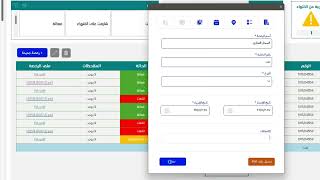
1. Adding competitions easily
• You can add all competitions in one place by copying and pasting the competition link, so data is automatically pulled without manual typing. Then, you can select the competition status from nine different options:
• For preview: just monitoring the competition.
• The brochure has been purchased: the competition brochure has been bought.
• The offer has been submitted: the competition offer has been submitted.
• Awarded: the competition has been awarded to you.
• Not awarded: the competition was not awarded to you.
• Financial claim submitted: the project has been completed and the financial claim has been submitted.
• Ended: the project has ended and the amount has been disbursed.
• Canceled: the competition was canceled by the government entity.
• Not submitted: the competition was for preview only, and no submission was made.
2. Deadlines for submitting offers
• You can easily view the deadlines for all competitions directly from the system, without needing to log into the "Etemad" platform each time. 💻✨ These dates are continuously updated to always match what is on the Etemad platform. ⏰🔄 This way, you stay always informed of the latest updates, and you won't miss any changes!
3. Information screen with number of statuses
• A screen displaying available statuses with their counts. By clicking on any status, such as “For preview,” only projects with that status are shown, making review easier.
4. Brochure purchase amounts screen
• A screen that shows the amounts paid for brochure purchases, for projects with statuses:
• Brochure purchased
• Not awarded
• Awarded
• Financial claim submitted
• Ended
• Offer submitted
• It also displays amounts paid for canceled projects, helping you track canceled competitions and recoverable amounts.
5. Opening competition in the browser
• By clicking on the competition name, the link opens directly in the browser, providing quick access to competition details.
6. Search and inquiry page
• You can easily search using the project name, reference number, government entity name, or project status. This facilitates quick access to the information you need.
Benefits:
Better organization: No more searching through multiple files or forgetting submission deadlines.
Time saving: Everything is organized in one place, saving you time and effort.
Increased success chances: Continuous monitoring and updates of competition statuses.
Financial control: Helps you monitor brochure purchase costs accurately.
Easy access to information: The search and inquiry page makes accessing information quick and easy.
-------------------------------------------------------------------------------------------------
If you're interested in simplifying the competition follow-up process and achieving the best results, this file is what you need! 💼💡 For any inquiries, do not hesitate to contact us. 🚀
-------------------------------------------------------------------------------------------------
Legal note: Any unauthorized use of this file, including selling or distributing it without permission, will subject the owner to legal action. 🚫⚖️
--------------------------------------------------------------------------------------------------
*💡 Note: It is recommended to use the file on a Windows system for proper functionality.
Attachments:
Excel file
Fonts used in the file
Usage explanation

From Abha